Table Keyboard
Your Desk Is the Keyboard — Type on Your Mac (only available in visionOS)
5.0
Screenshots
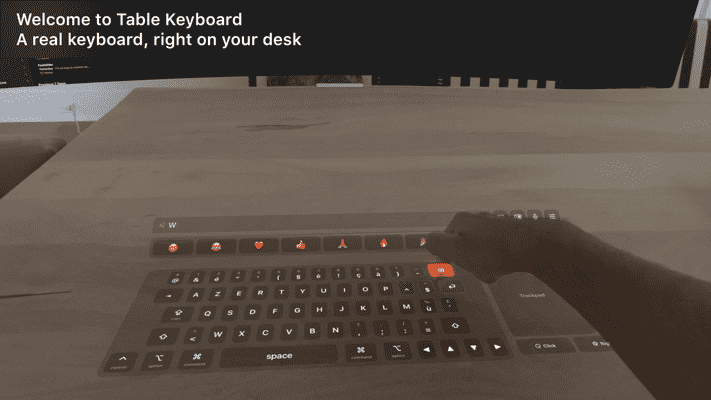
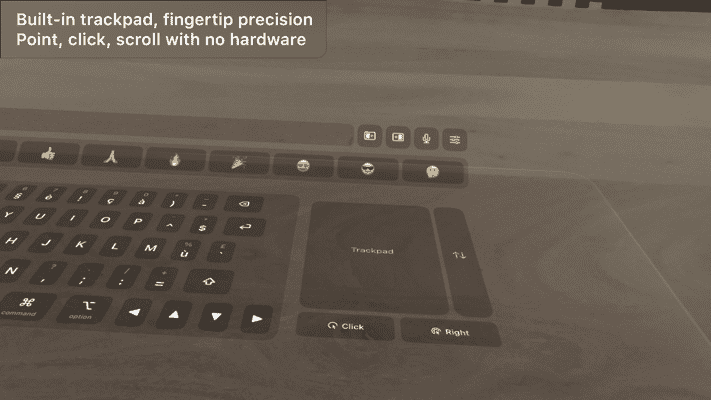
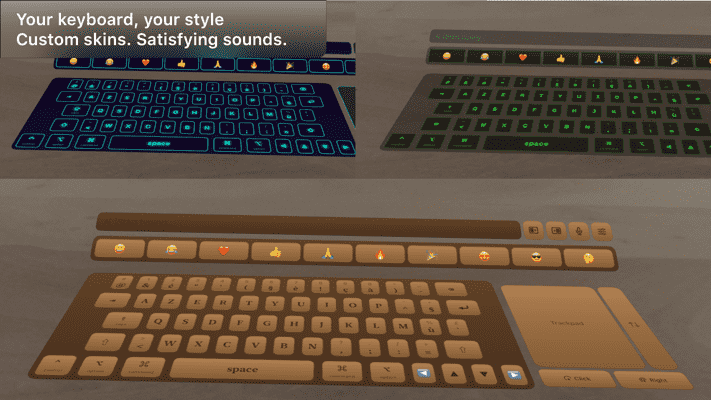
Table Keyboard — Your Desk Is the Keyboard
Table Keyboard drops a full keyboard, trackpad and emoji bar flat onto your real table in Apple Vision Pro, and sends every keystroke straight to your Mac over the local network. No hardware to buy, no pairing codes, no cables.
Look down, and your input surface is already there.
Key Features
Real mechanical sound: 16 sampled switch libraries — Cherry MX Brown, Blue and Black, Holy Panda, Gateron Ink, NovelKeys Cream, a vintage typewriter and more
Types into anything: Keystrokes become real system events on macOS — Notes, Xcode, your browser, the terminal
The Touch Bar, reborn: A contextual strip follows whatever app is frontmost on your Mac — Safari tabs, Finder folders, Xcode build controls, Music and Spotify transport
Widgets on your desk: Clock, calendar, reminders, pomodoro, world clock, live Mac system stats and quick notes, standing beside the keyboard
Your Mac's Dock, within reach: Your real Dock mirrors itself in front of the keys — tap an app to launch or switch to it
Mac mode: Hides the virtual keys and arranges everything around your real MacBook instead, from an Air to a 16 inch
Full Desk Setup, No Desk Gear
• QWERTY and AZERTY layouts
• Precise trackpad with a scroll strip, left and right click
• Emoji bar always within reach
• Logitech Muse support: notes panel and precision stylus mode
• Six skins, from clean glass to RGB light bursts
• Three sizes, scale it to fit your space
Connects On Its Own
The free Mac companion appears on your network over Bonjour. The headset finds it and connects automatically. Grant Accessibility once and you're typing in seconds.
Requires the free Table Keyboard Mac companion (macOS 26, Apple Silicon). Not affiliated with Apple.